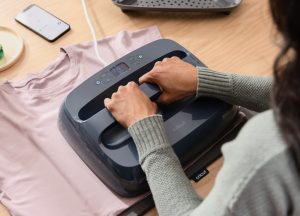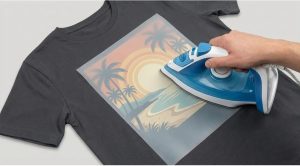
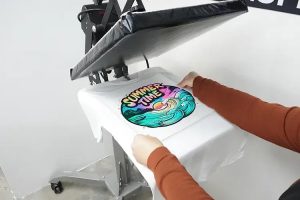
A heat press is the most reliable and efficient tool for applying DTF transfers. It provides even pressure and consistent heat, which ensures a flawless transfer every time. For small businesses, DIY enthusiasts, or professionals, this method guarantees the best results in the shortest time. Follow these steps to achieve a perfect hot-peel transfer using your heat press.Step 1: Set your heat press to 290-310°F .Step 2: Preheat the garment for 5-10 seconds to remove moisture.Step 3: Place the DTF transfer on the garment with the design facing down.Step 4: Press the garment with medium pressure for 10 to 15 seconds.Step 5: Immediately after pressing, while still hot, peel the transfer sheet off smoothly and quickly.Step 6: Press again for 10 to 15 seconds with a cover sheet for added durability .The Cricut EasyPress offers the convenience of a compact and portable heat press, perfect for home projects and small businesses. It delivers even heat across the surface, making it easier to achieve professional results compared to a standard iron. With its digital temperature settings, it’s ideal for applying DTF transfers quickly and effectively. Here’s a simple guide to using the Cricut EasyPress for hot peel DTF transfersStep 1: Set the Cricut EasyPress to 310°F (154°C).Step 2: Preheat the garment for 5-10 seconds to remove moisture.Step 3: Place the DTF transfer on the garment with the design side down.Step 4: Press down firmly with the Cricut EasyPress for 15 seconds.Step 5: While still hot, peel the transfer sheet off quickly and smoothly.Step 6: For added durability, press again for 10 to 15 seconds using a cover sheet over the design.If you don’t have access to a heat press, an iron can also be used to apply DTF transfers. While it may not provide the same even pressure as a heat press, it’s a great alternative for personal projects or small orders. Just ensure you maintain firm pressure and monitor the heat carefully. Here’s how to use an iron for your DTF transfers with a hot peel process.Step 1: Set the iron to a high cotton setting, ensuring there is no steam.Step 2: Preheat the garment for 5 to 10 seconds to remove moisture.Step 3: Place the DTF transfer on the garment with the design side down.Step 4: Press the iron firmly onto the transfer, moving it over the design for about 20-25 seconds.Step 5: Immediately, while the transfer is still hot, peel off the transfer sheet.Step 6: (Optional) Place a cover sheet over the design and press for another 10-15 seconds to ensure durability.*******************************************************************************************************Frequently Asked Questions About DTF Heat PressingWhat temperature should I use for pressing DTF transfers?The ideal pressing temperature for DTF transfers is between 290°F and 310°F, depending on the type of fabric you’re using.How long should I press my DTF design?You should press DTF transfers for 10 to 15 seconds using medium pressure. Make sure the heat press is evenly distributed.Should I peel the film hot or cold?Next Level DTF Transfers are hot peel, so you can peel the film immediately after pressing for a fast, smooth workflow.Do I need to preheat the garment before applying the transfer?It is recommended to pre-press the garment for 5 to 7 seconds to remove moisture and wrinkles, ensuring better adhesion.Can I use a home iron instead of a heat press?It depends on the project. But we strongly recommed heat press. Home irons do not provide consistent pressure or temperature, which is essential for proper transfer bonding.